
How to Enter a Show
Gallery Exhibits
- Gallery EXHIBITS are walk-in (online entry is not required.)
- Download and complete the waiver form
- Download and complete TWO walls cards for each painting (One for the back and one for the wall)
- Upload images to website for corresponding online show. This is for your benefit!
- Staring January 2026 – Pay entry Fee of $20 at receiving
- RECEIVING: Bring entry form, wall cards, payment, and paintings to receiving.
Major Shows
- Walk-ins are not accepted, Entry must be completed online
- Carefully review all requirements posted in the online prospectus
- Complete the online waiver/entry form
- Upload images to the online show
- Make sure the title and your name are on the back of your painting.
- RECEIVING: Bring paintings to the hosted location on receiving day.
- Paper forms are not needed – you already did them online.
- Wall cards will be printed for you.
- Each Major show will have a different Prospectus (rules). Be sure to read the prospectus for each show.
How to upload images for the online show
It is your responsibility to upload images.
If you do not upload them, they are not in the online show.
Every Exhibit or Show allows the artist to upload their images for the online show. Each show will have it’s own link to upload images. The link becomes live 30 days prior to the show and closes the day after receiving. After receiving, any images we have will be converted to a different format and uploading can only be done by the webmaster.
So how do you upload your images.
- Take a photo of your art
- Crop out everything except the art itself; remove all background, frame, and mat.
- Make sure the image is rotated correctly and squared.
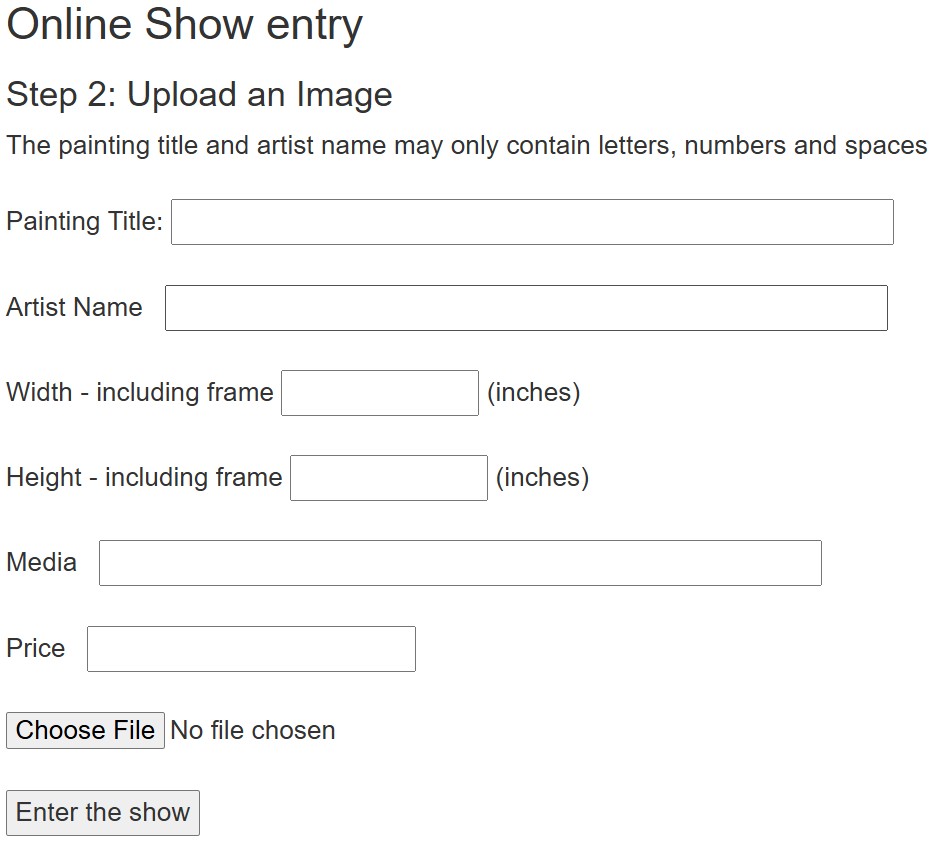
- Go to the upload link and enter the password. (The password hint is displayed for you.
(This is a picture of the image upload screen)

Best Practices:
- No special Characters! Entry Fields will not accept any special characters (apostrophes / commas / dashes)
- The photo should be of the painting only.
- The matting and frame should not be included in the image.
- To replace an image, upload the new image with the same Title and Artist Name.
- To delete an image, send the deletion request to [email protected]
- Images will be resized automatically
- Enter all your information in the form.
- Remember: special characters are not allowed in any fields. (EX: aren’t should be enter as are not.)
- Click on choose File and select your image.
- Enter the show
- You should see a message indicating success and the latest two images uploaded.
- If you need to make any changes, upload it again with the correct information and let the webmaster know.